 RepeatMe
How to make a card with a gap in a sentence
A card with a gap tests a word inside a sentence rather than on its own, where you would have to use it. You will need a deck with a card in it: a gap is added to a card that already exists.
Write the sentence with a gap
On the deck page, open the card for editing and tick Cloze Type or Cloze Choice in the list of modes. The gap fields appear right there, in the same form.
In Context sentence, write the whole sentence and put
{{answer}}where the gap belongs:I eat an {{answer}} every day.In Cloze answer(s), give the word that fills the gap.
For Cloze Choice, also fill in Distractors (wrong options), separated by commas. Without them there is nothing to choose between.
Press Save.
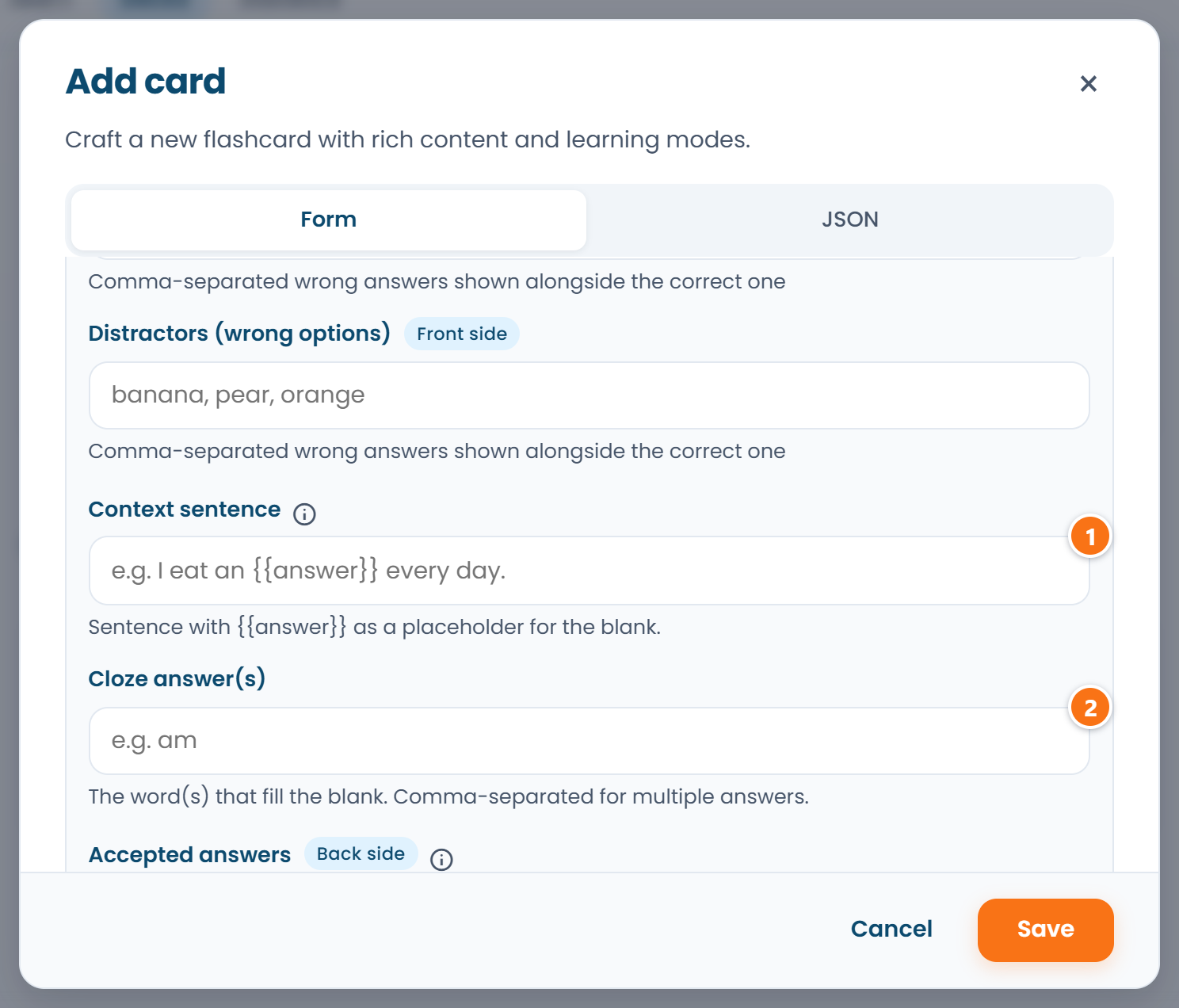 ① — the context sentence, ② — the cloze answer. The fields appear once a gap mode is on.
The placeholder is required: without it the form will not accept the sentence and says so. It also
fixes where the gap falls: the learner sees your sentence exactly as written, with an input in
place of {{answer}}.
One sentence can hold several placeholders:
Open {{answer}} 9 a.m. {{answer}} 6 p.m.
You then get that many gaps, and the words for them are listed in Cloze answer(s) separated by commas, one per gap, in the same order. The comma separates gaps here, not synonyms of one answer.
Typing into the gap or picking an option
The gap comes in two modes, and they do not replace each other, and switching both on is fine.
- Cloze Type. The learner types the word. The answer is compared character by character: a one- or two-character typo still passes, a different word does not, even a correct one.
- Cloze Choice. The learner picks from options. Besides the answer you fill in Distractors (wrong options): they are placed alongside the correct one and the list is shuffled.
Typing is harder than picking, and the schedule takes that into account: a card passed by typing into the gap moves further out than the same card guessed from options. How that is calculated is in When a card comes back.
When the right answer is nothing at all
A zero article or a bare verb is knowledge too, and a gap is a good way to ask for it. Tick No word needed — the answer is "nothing" on the card and leave the cloze answer empty.
In the typing mode the learner then leaves the box empty and presses Check; in the choice mode a "nothing" option appears among the others.
FAQ
Do I have to write the sentence by hand?
No. Filling a card in with AI writes the context sentence along with the other mode fields, and an import brings it across from the file. You write it by hand when it matters that the sentence is yours.
What if the cloze answer differs from the card's back?
That is fine: the gap is graded against its own cloze answer, not against the back of the card. That is exactly what you want when the sentence calls for a different form of the word.
What if two different words fit the gap?
Cloze answer(s) takes one word per gap, so the second one is not added there. It is accepted from the list of credited answers instead: as soon as someone types that form and presses Count as correct, it arrives on your Statistics page, on the My publications tab, and goes into the card in one press. See Your answer was right but the card refused it. You do not have to wait for a learner: on your own deck it works the same when you take the card yourself.
The card will not save: what is wrong?
Usually Context sentence has no {{answer}} in it: the form shows the error under the field and
refuses to save until the placeholder is there. A gap needs an authored sentence; without one there
is nothing to show. For which fields unlock the other modes, see
One card, nine questions.
Where is the full card format documented?
The exact field schema lives in the card format guide. Help explains the task, the guide fixes the format, and the two must not drift apart: both are built from one source.